Must-have Claude skills for a digital agency
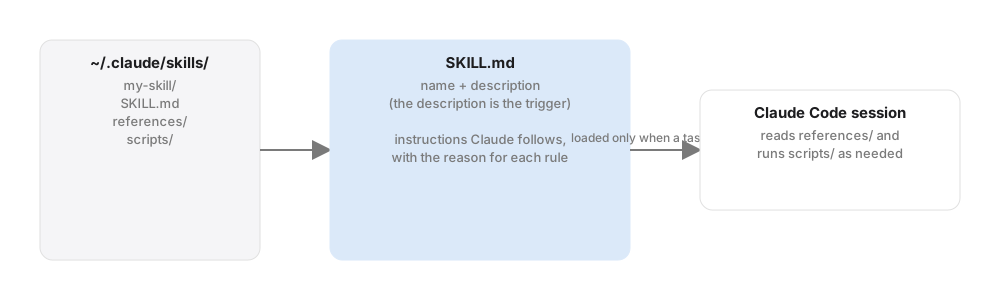
A Claude skill is a folder with a SKILL.md file: instructions, sometimes scripts and references, that Claude Code loads only when a task matches. Skills are how you turn a general agent into one that knows your stack, your formats and your rules. After a year of running them across client work, these are the ones we consider mandatory.
1. The Anthropic document skills
Word, PowerPoint, Excel and PDF. Anthropic publishes skills that let Claude read and produce .docx, .pptx, .xlsx and .pdf files properly, with real tables of contents, charts, formulas and tracked changes. Every client report, proposal and audit we send starts here. Install them once from Anthropic's skills repository and forget about them.
2. Cloudflare's skills and MCP servers
Cloudflare publishes an official plugin bundle for Claude Code: Workers best practices, Wrangler, Durable Objects, Turnstile, web performance and email. Two commands install everything:
claude plugin marketplace add cloudflare/skills
claude plugin install cloudflare@cloudflare
The Turnstile skill alone is worth it. It creates the widget, wires the server-side check and validates the integration end to end. We used it on this site's contact form.
3. WordPress review skills
A set of narrow skills for the WordPress work that keeps coming back: performance review, security review, plugin and theme development, WooCommerce, accessibility. Each one encodes the checklist a senior developer would run, so a junior with Claude gets the senior's review. Pair them with a WordPress MCP connection (we compared Elementor MCP and Novamira) and the review runs against the live site.
4. Code review and simplify
Claude Code ships a review command that hunts correctness bugs in a diff at a chosen effort level, and a companion that looks only for simplification and reuse. Run review before every pull request and simplify after the feature works. It catches the "works on the happy path" edits every agent makes.

5. Your house-style skill
Nobody publishes this one, and it is the most valuable. Ours holds: how we name things, the ticket format our Jira board expects, which clients are read-only, our brand tokens, and the twenty gotchas we learned the hard way (which host wipes which directory, which cache needs clearing after which edit). Write it as plain instructions with a Why and How to apply for each rule. Claude follows rules it understands the reason for far more reliably than bare commands.
6. Workflow skills you make with skill-creator
Anthropic's skill-creator skill helps you write, test and benchmark a new skill. Our own, built with it: a 360-degree site audit that pulls GA4, Search Console, Tag Manager, Business Profile and Clarity into one prioritised action list; a call-to-action audit that crawls every page and verifies every link; and a "content change to ticket" skill that turns a client's new copy into a structured spec. Each replaced a half-day manual routine.
Housekeeping
- Skills live in
~/.claude/skills/(personal) or.claude/skills/in a repository (shared with the team). - After installing plugins, run
/reload-pluginsinside Claude Code. - Keep descriptions specific. A skill triggers on its description; vague descriptions fire on everything or nothing.
- Review third-party skills before enabling them. A skill is instructions the agent will follow.
Start with the first two, write the fifth this week, and add the rest as the work demands. If you want help building skills for your team's workflow, talk to us.